

Attachment Security for Microsoft Outlook 1.0
Unlock blocked Outlook attachments with this free software program - free to use
Lookout Software
Do you need access to an Outlook blocked attachment?
Outlook blocks access to a list of potentially unsafe attachments. Microsoft, in an attempt to make Outlook more secure with regards to computer viruses delivered by email in the form of attachments, added a feature to Microsoft Outlook that blocks attachments of certain file types. These file types are referred to as Level 1 file attachments. Level 1 attachments, by default, are hidden by Microsoft Outlook and cannot be viewed, saved or opened.
Because Outlook now blocks many popular file types by classifying them, by default, as Level 1 attachments, many Outlook users are seeking more control over receiving and manipulating these file types from within Microsoft Outlook. However, Microsoft does not provide a simple to use interface for common Outlook users to select which file types they want to receive and manipulate from within Outlook.
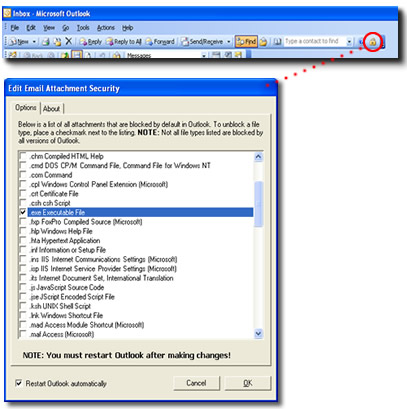
AttachmentSecurity for Microsoft Outlook solves this problem by presenting an easy-to-use interface that allows you to select precisely which file attachment types you want to block or unblock from within Outlook. Because AttachmentSecurity is a Microsoft Outlook addin, you control it directly from within your own copy of Outlook; using it when you need it, while keeping Outlook secure from viruses when you don't. Best of all, it's free to use!


Oracle Corp. expects to generate about $65 billion in annual revenue by fiscal year 2026, an outlook executives first provided a year ago, in a lukewarm message to investors disappointed by the softwa...
In early June, sporadic but serious service disruptions plagued Microsoft’s flagship office suite — including the Outlook email and OneDrive file-sharing apps — and cloud computing platform. A shadowy...
Now, Microsoft has said a little more about what will happen to Windows 11’s existing Email and Calendar apps. Basically, they will cease to exist at the end 2024. In September next year, the new Outl...
 News archive...
| New Post | Top rated post |
|---|---|
|
August 04, 2014
How to recover my emails deleted from my computer?
August 04, 2014
How to Convert OST to PST File?
August 02, 2014
Can someone recommend non-Outlook PST viewer?
July 23, 2014
Moved to MS Exchange now Outlook rules wont work
July 19, 2014
Can't send e-mails from Outlook 2007 |
No results found.
|