

GrandBackup Business 1.2
A user-friendly, intuitive interface for automatic backup of files and folders.
Regall LLC
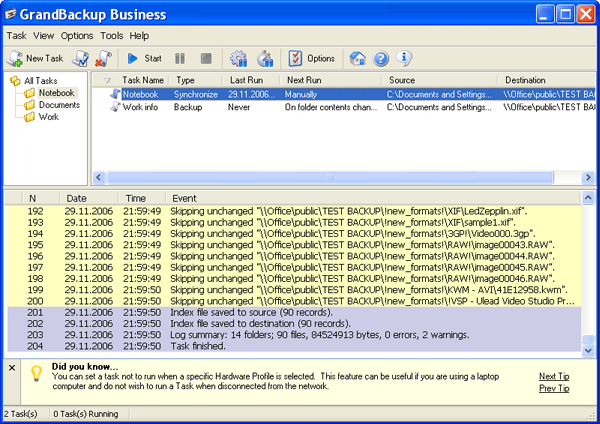
GrandBackup Business provides a friendly interface for easy backup of important files and folders. Backup copies can be compressed, encrypted and password-protected for user's peace of mind. Backups can be saved to any secure location that has been specified by the user. This may be a folder on the hard disk of a local computer or a laptop or any network machine.
Moreover, the program allows saving backups to CD/DVD disks. The size of a backup doesn't matter. If a backup copy is too large to fit the disk, GrandBackup can span it across multiple disks.Making backups with GrandBackup Business is very easy.
Even users with little exposure to computer technologies can learn how to do this in a couple of minutes. The program offers an Explorer-style interface which is familiar to any Windows user, plus a Backup Task Setup dialog that guides users through the setup process in a step-by-step manner. Users only need to set up a backup task, describe a source location, a destination and specify the interval at whichthey want a backup to be executed. When the specified time is reached, GrandBackup performs the backup task in the background automatically without any user interference.
GrandBackup Business offers many options to automate the launch of backup tasks:
For example, the Media SmartDetect technology implemented in the program allows starting an automatic backup on detecting an external disk. Other options include auto-running backups on file size/attribute change, folder contents change, file/folder renaming, and according to a schedule. This choice of options allows users to automate backup tasks in the way that best suits their personal needs. Among other features, GrandBackup Business offers FTP support, folder synchronization, ZIP compression, and background thread priority control. Any number of files can be excluded from a backup task and several old versions of files and obsolete files can be kept in the backup or a separate archive folder.
Compabilities:
- Windows XP
- Windows 2000
- Windows 2003
- Windows Media Center Edition 2005
- Windows Vista


Oracle Corp. expects to generate about $65 billion in annual revenue by fiscal year 2026, an outlook executives first provided a year ago, in a lukewarm message to investors disappointed by the softwa...
In early June, sporadic but serious service disruptions plagued Microsoft’s flagship office suite — including the Outlook email and OneDrive file-sharing apps — and cloud computing platform. A shadowy...
Now, Microsoft has said a little more about what will happen to Windows 11’s existing Email and Calendar apps. Basically, they will cease to exist at the end 2024. In September next year, the new Outl...
 News archive...
| New Post | Top rated post |
|---|---|
|
August 04, 2014
How to recover my emails deleted from my computer?
August 04, 2014
How to Convert OST to PST File?
August 02, 2014
Can someone recommend non-Outlook PST viewer?
July 23, 2014
Moved to MS Exchange now Outlook rules wont work
July 19, 2014
Can't send e-mails from Outlook 2007 |
No results found.
|