
InsertText 1.1.118
Outlook addon that allows you to quickly and easily insert pre-written text blocks into email replies.
Addins4Outlook
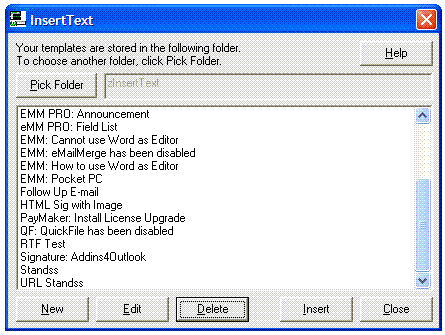
Your customer service and technical support teams spend hours each day repeating a particular task that not only wastes their time (and your money) but can contribute to job dissatisfaction and poor performance.
That task is: typing in answers to the same customer queries over and over.
InsertText 4Outlook is an Outlook addon that allows you to quickly and easily insert pre-written text blocks into email replies.
So instead of spending 5 to 10 minutes crafting a written response, you can insert a ready-made, professional reply in just seconds using InsertText 4Outlook.
InsertText 4Outlook is the ideal time-saving tool for:
- sales personnel
- marketing staff
- technical support staff
- customer service staff
- anyone who spends a lot of time retyping standard information.
Whether you run a small office or a busy customer support department, our handy Outlook addon solves these email-related problems:
- Typos, spelling, and grammar mistakes easily creep into emails when you're bored and doing a task for the millionth time. InsertText 4Outlook takes the risk out.
- Having a bad day? It's easy for your email recipients to read between the lines and pick up your bad vibes. InsertText 4Outlook lets you respond professionally with a proofed and perfected email template.
- Finding it hard to keep good staff? InsertText 4Outlook takes some of the boredom out by doing a repetitious job for them.
With the click of a mouse, our Outlook addon instantly delivers email template fragments in either plain text or formatted HTML.
Here's how easy it is to get set up:
- Download InsertText 4Outlook.
- Compile a list of answers to frequently-asked questions that are well written and checked for errors.
- Save them to InsertText 4Outlook to create your email template... it just takes seconds. And it's easy to add new fragments as needed.
- Then, when a query arrives, you or your team member selects the correct answer from InsertText 4Outlook and inserts it with a single click. (If desired, you can customize these fragments with additional text.)
You can also use InsertText 4Outlook for other time-saving tasks: to store passwords and account IDs for quick access; save favorite URLs; save marketing and sales materials you send out frequently like banners and sales letters.
Plus, InsertText 4Outlook can be used in a public folder in MS Exchange to create a company-wide knowledge base that everyone can access.


Oracle Corp. expects to generate about $65 billion in annual revenue by fiscal year 2026, an outlook executives first provided a year ago, in a lukewarm message to investors disappointed by the softwa...
In early June, sporadic but serious service disruptions plagued Microsoft’s flagship office suite — including the Outlook email and OneDrive file-sharing apps — and cloud computing platform. A shadowy...
Now, Microsoft has said a little more about what will happen to Windows 11’s existing Email and Calendar apps. Basically, they will cease to exist at the end 2024. In September next year, the new Outl...
 News archive...
| New Post | Top rated post |
|---|---|
|
August 04, 2014
How to recover my emails deleted from my computer?
August 04, 2014
How to Convert OST to PST File?
August 02, 2014
Can someone recommend non-Outlook PST viewer?
July 23, 2014
Moved to MS Exchange now Outlook rules wont work
July 19, 2014
Can't send e-mails from Outlook 2007 |
No results found.
|