

Live Signatures 2.3
Outlook add-in that allows you to insert various macros into message.
MAPILab Ltd.
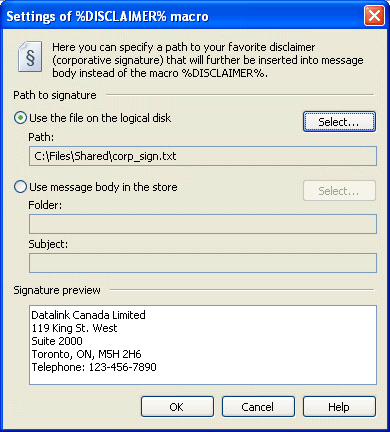
Live Signatures is an easy and handy Outlook add-in for automatic substitution of actual data in outgoing messages. A wide set of macros will allow you to automatically insert text into e-mails from other messages or local files, use changeable / variable signatures in the messages, enrich the messages with the statements of famous people (or your own expressions). Because of the macros system, you can insert auto-text or signatures only in the necessary messages, or also in all messages, if the macro Live Signatures is added to the signatures of Microsoft Outlook. Moreover, this Outlook add-in gives a possibility to enhance the number of macros by creating or linking them up.
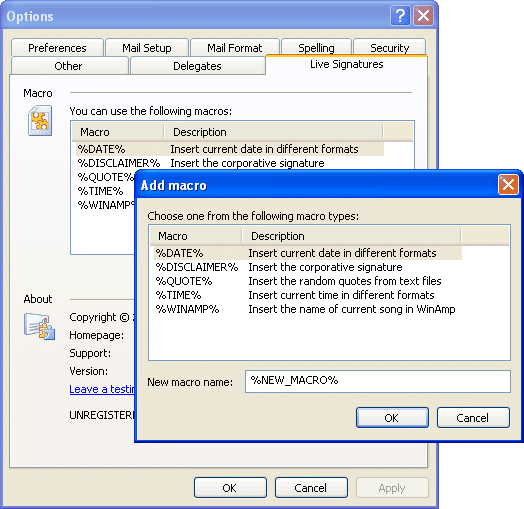
Functions of this Outlook add-in are not restricted to simple adding of a corporate signature to the messages. On the basis of Live Signatures you can organize automated mailing of company news, sending automatically created journals of program operations, weekly sending of price-lists or reports. With the help of Live Signatures the variable data can be sent by mail or used in the email signatures without making any changes during the message creation.
This Outlook add-in doesn't replace the built-in templates for signatures in Microsoft Outlook, it extends their functionality and makes them live: you can modify your current signature templates in Microsoft Outlook by adding new macros from Live Signatures.
Live Signatures works with all types of Microsoft Outlook message editors and supports all message formats (HTML, Plain Text, RTF). Any message in Microsoft Outlook (including message in public folders of Microsoft Exchange Server) and file saved locally or in the public folder can be used as a data source.
Currently, Live Signatures contains the following macro types:
- %RSS% — Enables you to include data from the RSS feed in your email.
- %DISCLAIMER% — Allows adding data into a message from a file or E-mail.
- %TIME% — Allows adding the current time into the message.
- %DATE% — Allows adding the current date in the message.
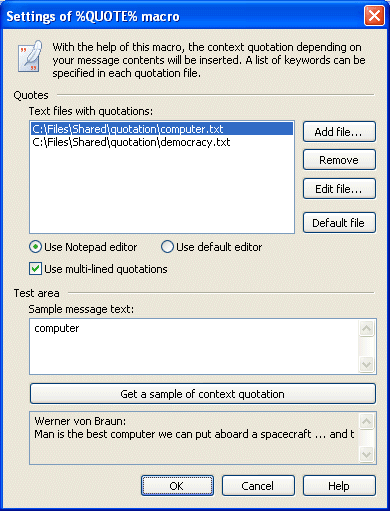
- %QUOTE% — Allows adding a randomly chosen quote to a message from a data file.
- %WINAMP% — Allows adding a name of the currently played track in WinAmp (or other player on its basis) into the message.
Later on, this list can be extended by adding new macros types that can be created by the program user as well as by our company. Because of such extensibility of Live Signatures, other scenarios different from the simple text substitution are possible.
Compabilities:
- Microsoft Outlook 2000, 2002/XP, 2003, 2007;
- Microsoft Windows 95, 98, NT, ME, 2000, XP, 2003, Vista.
Supported languages (program interface and help file)
- English.


Oracle Corp. expects to generate about $65 billion in annual revenue by fiscal year 2026, an outlook executives first provided a year ago, in a lukewarm message to investors disappointed by the softwa...
In early June, sporadic but serious service disruptions plagued Microsoft’s flagship office suite — including the Outlook email and OneDrive file-sharing apps — and cloud computing platform. A shadowy...
Now, Microsoft has said a little more about what will happen to Windows 11’s existing Email and Calendar apps. Basically, they will cease to exist at the end 2024. In September next year, the new Outl...
 News archive...
| New Post | Top rated post |
|---|---|
|
August 04, 2014
How to recover my emails deleted from my computer?
August 04, 2014
How to Convert OST to PST File?
August 02, 2014
Can someone recommend non-Outlook PST viewer?
July 23, 2014
Moved to MS Exchange now Outlook rules wont work
July 19, 2014
Can't send e-mails from Outlook 2007 |
No results found.
|