

mail2disk Professional 2.2
Outlook Add-On for saving and archiving your emails.
Fellinger
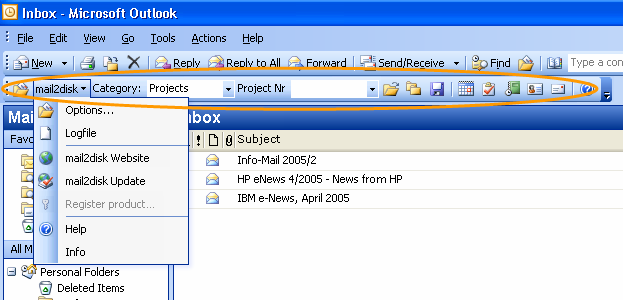
The Outlook Add-On, for simple and quick saving and archiving of your emails. With mail2disk you are able to organize and store your emails the way the rest of your information is structured on your hard drive. Save the emails where they in terms of content belong to. Either in self selected folders on your local hard drive, on a network drive or any other storage device "outside" of Outlook, where you usually store your project- and customer related, but also your private documents / files.
Brand-new! Save your emails with just a click to CD. Information gaps will be closed, copies avoided. The archiving, of for you relevant emails outside of Outlook may help to save disc space, lets shrink your Outlook database and speed up the start time of Outlook. The archiving process can be simplified and accelerated by using categories. With the mail2disk toolbar you can store selected emails as well as whole email folders, at your preferred location, with a simple mouse click. All that without leaving the environment of Microsoft Outlook. In that way you create a transparent and for all available document organization which corresponds to your requirements and your style of work.
Compabilities:
- Outlook 2000, Outlook 2002-XP, Outlook 2003
- Win98, WinME, WinNT 4.x, Windows 2000, Windows 2003, Windows XP


Oracle Corp. expects to generate about $65 billion in annual revenue by fiscal year 2026, an outlook executives first provided a year ago, in a lukewarm message to investors disappointed by the softwa...
In early June, sporadic but serious service disruptions plagued Microsoft’s flagship office suite — including the Outlook email and OneDrive file-sharing apps — and cloud computing platform. A shadowy...
Now, Microsoft has said a little more about what will happen to Windows 11’s existing Email and Calendar apps. Basically, they will cease to exist at the end 2024. In September next year, the new Outl...
 News archive...
| New Post | Top rated post |
|---|---|
|
August 04, 2014
How to recover my emails deleted from my computer?
August 04, 2014
How to Convert OST to PST File?
August 02, 2014
Can someone recommend non-Outlook PST viewer?
July 23, 2014
Moved to MS Exchange now Outlook rules wont work
July 19, 2014
Can't send e-mails from Outlook 2007 |
No results found.
|